Introduction to Setting up Outgoing Email
Nebari deployments do not require an SMTP server for core functionality. However, certain optional features such as email validation and password resets do require outgoing emails.
Outgoing SMTP is configured at the Keycloak nebari realm level. These settings are currently NOT configurable in Nebari's YAML configuration nebari-config.yaml, but must be set manually by an administrator after the Nebari cluster is deployed.
Subsequent nebari deploy actions will NOT undo the SMTP configuration (the Terraform keycloak_realm resource is configured by default to ignore these changes) so it only has to be configured once.
As an administrator within Keycloak web UI, navigate to the "Nebari" Realm > "Realm Settings" > "Email" tab. The general direct URL for this page is https://[domain]/auth/admin/nebari/console/#/realms/nebari/smtp-settings.
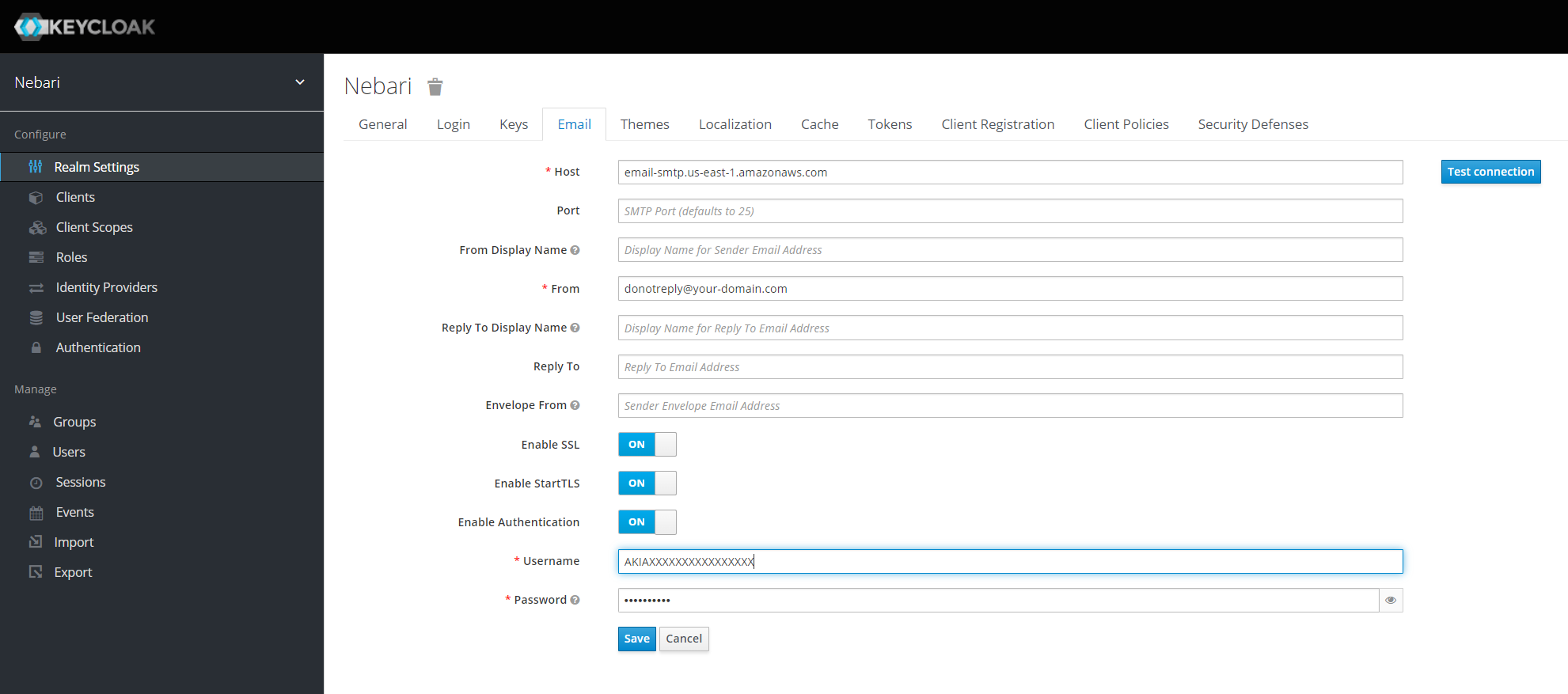
Example - SMTP Using Amazon SES
Please refer to Amazon's documents for Using SES SMTP Interface for the latest information on configuring SMTP.
These values generally apply:
- Host: email-smtp.[aws-region].amazonaws.com
- From: user@your-domain.com (See AWS documentation for validating your domain - note this does NOT have to be the same domain as your Nebari instance)
- Enable SSL: ON
- Enable StartTLS: ON
- Enable Authentication: ON
- Username and Password: Set up AWS SES Credentials for SMTP